Instagram dimensions guide
Instagram Grid Size Guide
A practical 2026 guide to 1:1 grid tiles, 4:5 portrait posts, 3:4 profile previews, and 3x3 puzzle grids so your split images look intentional in both the feed and the profile.
Need a tool instead of a guide? Open Instagram Grid Maker · 3x3 Grid Planner · Carousel Splitter · Panorama Splitter
Reviewed May 2026
The practical Instagram grid size answer
Instagram size advice is confusing because there are two different surfaces: the feed post itself and the profile grid preview. A post can be square, portrait, or landscape, but the profile grid may crop the same post differently depending on the app version, account type, region, and whether Instagram is showing a classic square grid or a taller preview.
For most creators, the safest planning rule is simple: design important content for a 1080 px wide canvas, use 1080 x 1350 px for feed-first portrait posts, and keep text, faces, logos, and product edges inside a central safe area so the profile preview still looks intentional.
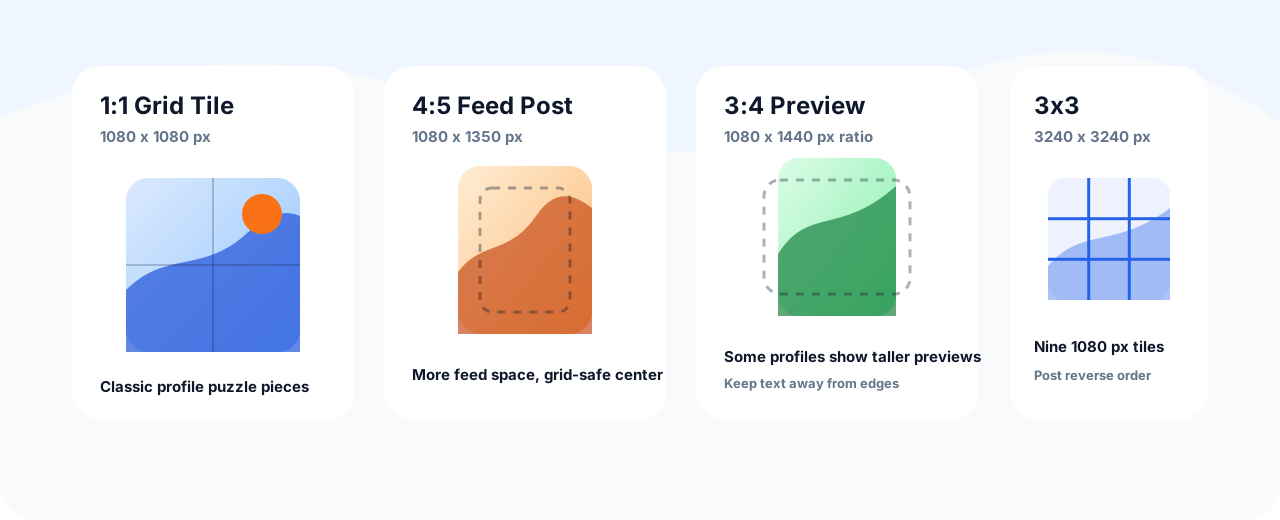
Quick size reference
Use these dimensions as a working baseline before you split an image, design a puzzle grid, or export a carousel. Exact profile previews can still vary, so preview before posting when the grid layout matters.
| Use case | Recommended size | Ratio | Notes |
|---|---|---|---|
| Classic square post | 1080 x 1080 px | 1:1 | Cleanest choice for old-style grid tiles and simple posts. |
| Portrait feed post | 1080 x 1350 px | 4:5 | Best balance for feed visibility and broad Instagram support. |
| Taller profile preview planning | 1080 x 1440 px canvas guide | 3:4 | Useful as a safe-area preview for accounts seeing taller profile thumbnails. |
| 3x3 puzzle grid | 3240 x 3240 px source | 1:1 tiles | Split into nine 1080 x 1080 px pieces and post in reverse order. |
| Carousel slide | 1080 x 1350 px per slide | 4:5 | Keep every slide the same ratio to avoid unexpected cropping. |
Planning a classic 3x3 puzzle grid?
Use the dedicated 3x3 planner after checking the size table. It opens with nine tiles by default and keeps the upload-order workflow close to the export step.
Why Instagram grid sizes feel inconsistent
Older guides often say every profile grid tile is square. That is still useful for classic puzzle grids, but it is not the full story anymore. Instagram has tested and rolled out taller profile previews in many places, which means a portrait post may not appear as a perfect square in every profile view.
The key is not chasing a single magic number. The key is designing with a safe area: make the post look strong as a 4:5 feed image, then make sure the central area still works if the profile preview is square or closer to 3:4.
Recommended workflow by goal
If you want a normal high-performing post
Use 1080 x 1350 px. It gives more vertical space in the feed than a square post while staying inside Instagram’s common portrait format.
If you want a classic 3x3 puzzle grid
Start from a 3240 x 3240 px canvas, split it into nine 1080 x 1080 px tiles, then upload from bottom-right to top-left so the profile assembles correctly.
If you care about newer portrait profile previews
Use a 1080 x 1350 px post, but preview a taller center crop. Keep faces, titles, and product labels away from the left and right edges.
If you are making a carousel
Pick one ratio for the whole sequence. For most carousel designs, 1080 x 1350 px per slide is the safest choice.
Safe-area rules before exporting
- Place headlines and logos near the center instead of the extreme edges.
- Avoid tiny text in puzzle grids because each tile becomes a separate post.
- Keep important faces away from vertical cut lines between grid pieces.
- Preview both the feed crop and the profile crop before uploading a campaign grid.
- Use the same color grade and contrast across all pieces so the grid feels intentional.
- Keep the original full-size canvas so you can re-export if Instagram changes how a preview is cropped.
Common grid size mistakes
Designing only for the profile grid
If each tile looks good only when the profile is viewed as a whole, followers may see weak individual posts in the feed.
Uploading a puzzle in the wrong order
Profile grids stack newest posts first. For a 3x3 puzzle, upload the bottom-right tile first and the top-left tile last.
Mixing square and portrait files in one carousel
Instagram may crop the carousel to match the first selected file. Keep the whole sequence consistent.
Instagram Grid Size FAQ
What is the best Instagram grid size in 2026? ▼
For feed-first posts, use 1080 x 1350 px. For a classic 3x3 profile puzzle, use a 3240 x 3240 px source and split it into nine 1080 x 1080 px tiles.
Is the Instagram profile grid square or portrait? ▼
It depends on the profile view and app behavior. Square planning is still useful for classic puzzle grids, but many creators now also check a taller portrait preview before posting.
What size should each 3x3 grid tile be? ▼
Use 1080 x 1080 px for each tile. A 3x3 grid needs a 3240 x 3240 px source image before splitting.
Should I use 4:5 or 1:1 for Instagram? ▼
Use 4:5 when feed visibility matters. Use 1:1 when you need predictable square tiles for a classic profile grid layout.
Can I split a 4:5 image into a profile grid? ▼
You can, but it needs more planning because profile previews and individual feed posts may crop differently. For puzzle grids, a square source is still easier to control.